Governance · Risk · Performance

Your one source of truth for governance.

Meetings, risks, controls, performance and actions in one record, so the board decides with the whole picture and you can show your working.

In progress · Board Meeting · item 5 of 5

  • 01Data hosted in the UK
  • 02One fee, every user: no per-seat pricing
  • 03Single sign-on and enforced MFA
  • 04An audit trail behind every change

1One source of truth

Governance is one record, usually kept in five places.

A portal, a spreadsheet, a slide deck and somebody's inbox, and none of them agree. In Parod the paper, the risk, the control, the action and the measure are one thread.

One supplier decision, followed through the record

See the whole picture when you decide

The risks and measures a paper touches sit beside it in the meeting.

Know that what was agreed gets done

Every action has an owner and a date. The overdue ones surface themselves.

Show your working when asked

Who saw what, what was decided and what has changed since is already on the record.

2What changes

Less time assembling the record. More time governing.

Five modules, all included. Nothing is sold separately.

Item 01Meetings

Meetings that run to time, with the minutes already drafted.

Papers annotated beforehand, votes and decisions recorded as they happen, and minutes generated from the record.

How Meetings works
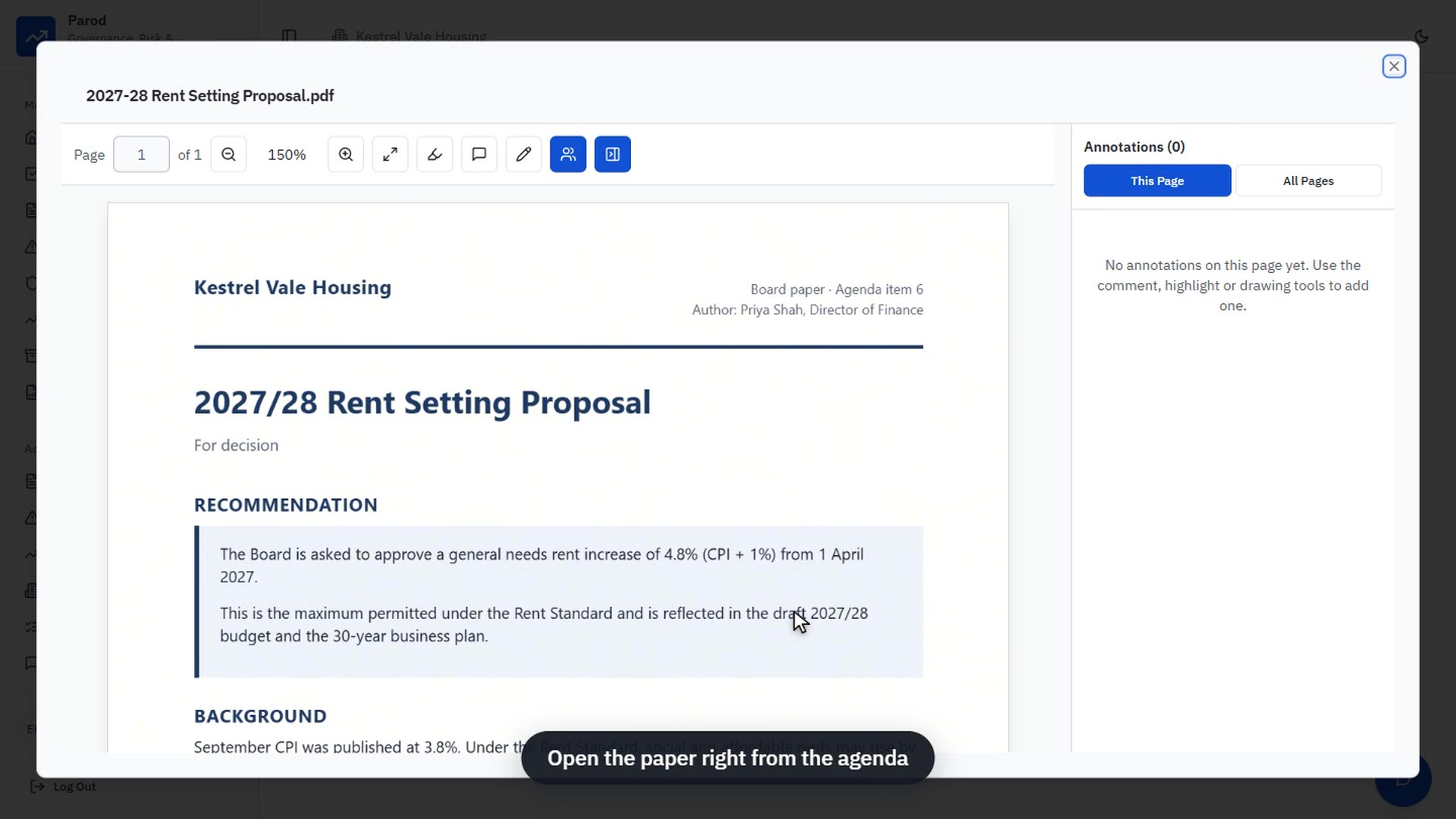
Fig. 2.1A board paper, annotated before the meeting

Item 02Risks & controls

Know that the risk register is actually being reviewed.

Every risk scored on one scale, every review dated and every control owned.

How Risks & controls works
Fig. 2.2Strategic risk register with its heat map

Item 03Performance

Performance reports that arrive on time and mean the same thing every time.

Reporting windows chase the people who hold the numbers, and status is worked out the same way for every measure.

How Performance works
Fig. 2.3Performance metrics, October reporting window open

Item 04Actions

Nothing agreed gets lost between meetings.

One list, whatever raised the action, with an owner, a due date and reminders by email, Teams or Google Chat.

How Actions works
Fig. 2.4My Actions, across every module

Item 05Documents & reports

The committee pack, assembled for you.

Papers findable in seconds, and governance reports generated on a schedule in PDF, Word or Excel.

How Documents & reports works
Fig. 2.5A committee pack assembled in the report builder

3Cai · Item 06

An assistant that has actually read the board pack.

Cai answers from your governance record, with citations that open the exact page, and turns a meeting transcript into draft notes and suggested actions.

Fig. 3.1Cai, asked about the price increase paper during the meeting
Off by default
Switched on per organisation, by explicit agreement.
Grounded, with citations
If the pack does not say it, Cai does not either.
Metered and audited
Every query is logged, with an audit view for administrators.
Never used for training
Paid AI services whose terms exclude training on your content.

4Security

Built to the boardroom’s standards.

Board papers are among the most sensitive documents an organisation holds. Parod treats them that way, and says plainly where the limits are.

Role-based access
Four roles, with access set per module, per register and per confidential item.
Single sign-on and MFA
SAML 2.0 with your identity provider, and MFA you can enforce.
Audit trails
Who changed what, when, and from what value.
Confidential items
Private agenda items are visible only to the people named on them.
Watermarked papers
A leaked copy traces back to the account that viewed it.
UK-hosted data
Database, documents, servers and email run from the UK. Optional AI processing is the one exception.
Fig. 4.1Field-level audit history on a risk
Read the security page

5Who it is for

For any board that wants to govern better.

Companies, groups, charities, housing associations and any other organisation that runs a board and committee cycle.

6Getting started

Judge it on your own board papers.

Start with one committee and see Parod working before you rely on it.

See it on your own papers
Bring a recent agenda, pack and register. We load them before the demonstration.
Pilot before you commit
Agreed case by case, usually one board or committee on the meetings module.
Answers in writing, before you sign
The data processing agreement, a briefing for your board and your security questionnaire, answered.
Running in days
Onboarding and single sign-on are included, and most teams run their first meeting in the same week.

7See it running

Three minutes of the real application.

Not a storyboard. A board meeting created, papered, voted and minuted in Parod itself.

8Due diligence

The questions your board, IT and audit teams will ask.

Anything else, ask us and a person will reply.

01We already have a board portal. What does moving involve?
Most organisations start with one board or committee on the meetings module, then bring in the risk register, measures and actions. Setup is done with you at no extra cost, and pilots are agreed case by case.
02How long does implementation take?
Days, not months. Most teams run their first meeting in the same week.
03Where is our data hosted?
In the United Kingdom. The one exception is Cai, if you choose to switch it on. The security page sets out every layer.
04Does Parod work on phones and tablets?
Yes. Parod installs as a web app on phones, tablets and computers.
05We are a group. Can one person belong to several organisations?
Yes. Each organisation has its own settings, registers and access, and people switch between them from the top bar.

Next step

Ready when your board is.

See Parod against your own agenda, the way your organisation actually governs.